How to Use Flight Schedule Pro
How to Use Flight Schedule Pro (FSP): A Student’s Guide
Starting flight training is exciting—but learning how to navigate your scheduling system is just as important as learning to fly.
At our school, we use Flight Schedule Pro (FSP) to manage everything from booking lessons to tracking your progress. Once you understand how it works, it becomes one of the most powerful tools in your training journey.
What is Flight Schedule Pro?
Let’s walk through it step by step.
Flight Schedule Pro is the platform you’ll use to:
Schedule flights with your instructor
Reserve aircraft
Track your training progress
Manage your account and payments
It’s designed to keep your training organized and efficient so you can focus on what matters most—flying.
Step 1: Logging In & Setting Up Your Profile
Once your account is created, you’ll receive login details.
When you log in:
Update your Preferred method of payment
Upload a profile photo (if required)
Review any documents or notes
Keeping your profile updated ensures smooth communication with your instructor and the admin team.
Step 2: Scheduling Your Flights (your first flight is created for you)
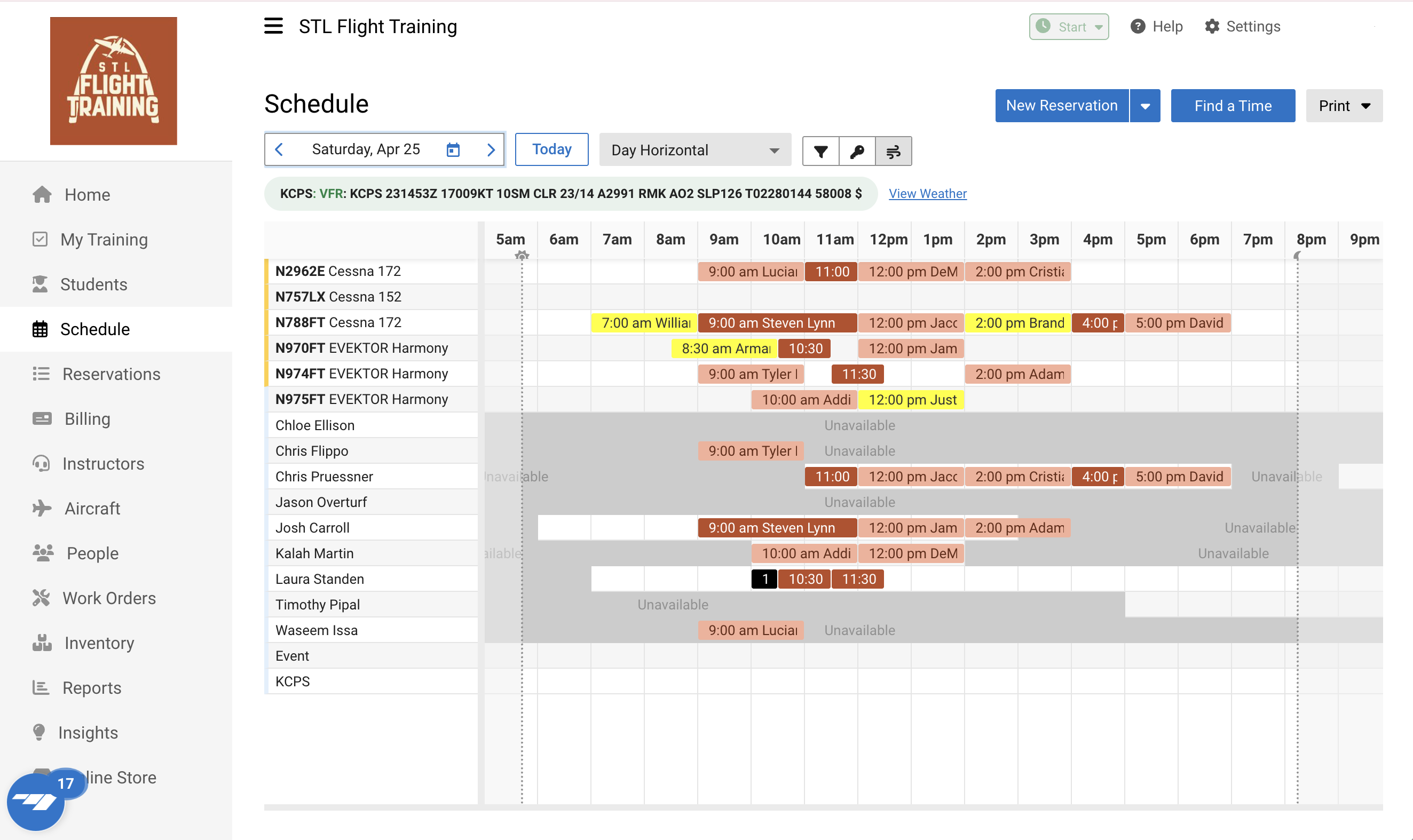
This is the core of FSP—and where you’ll spend most of your time.
To schedule a lesson:
Go to the Schedule tab
Select your instructor or aircraft
Choose an available time slot
Confirm your reservation
FSP allows you to view real-time availability for both aircraft and instructors, making it easy to plan ahead and stay consistent.
💡 Pro Tip: The most successful students schedule multiple lessons in advance to stay on track.
Step 3: Managing Your Reservations
Life happens—and FSP makes it easy to adjust.
Inside your account, you can:
View upcoming lessons
Reschedule flights
Cancel reservations if needed
Just be sure to follow our school’s cancellation policy -
24 Hour cancellation policy. Cancellations for any reason other than weather must be received at least 24 hours in advance
Step 4: Tracking Your Training Progress
One of the most powerful features of FSP is visibility into your progress.
You’ll be able to:
See completed lessons
Track milestones
Monitor how close you are to your next goal
Some schools even use a progress dashboard that shows whether you’re on track, ahead, or need additional focus.
This helps both you and your instructor stay aligned throughout your training.
Step 5: Managing Billing & Payments
FSP also handles your financial side of training.
You can:
Add a payment method
View invoices
Track your account balance
Keeping your payment method up to date ensures there are no delays in scheduling your flights.
6. Mobile Access: Training On the Go
Flight Schedule Pro also has a mobile app that allows you to:
Book flights
View your schedule
Make quick changes
It’s perfect for staying on top of your training when you’re not at your computer.
Final Thoughts: Set Yourself Up for Success
The more comfortable you are with Flight Schedule Pro, the smoother your training will be.
Take a few minutes to explore the platform, schedule ahead, and stay engaged with your progress.
If you ever feel stuck or unsure, don’t worry—that’s what we’re here for.
✈️ Your journey to becoming a pilot starts with showing up—and FSP helps make sure you do.
Quick Start Checklist
Before your first lesson, make sure you’ve:
Logged into Flight Schedule Pro
Updated your profile information
Added a valid payment method
Reviewed your upcoming reservation
Checked for any notes or instructions from your instructor
💡 Pro Tip: Booking multiple lessons in advance helps you stay consistent and progress faster.